You’ve picked the right GPU and watched every CPU benchmark video on YouTube. And then you spend 45 minutes on a product page, buy whatever has the most stars, and call it a day.
Which is how you end up with a 144Hz panel on a machine that can push 300FPS. Or a 4K monitor on an RTX 3060. Or a “professional” display that blatantly lies to you about colour.
There are five specs that actually matter when buying a monitor. Everything else is marketing. Here’s the no-nonsense breakdown.
Spec 1: The Basics – Resolution
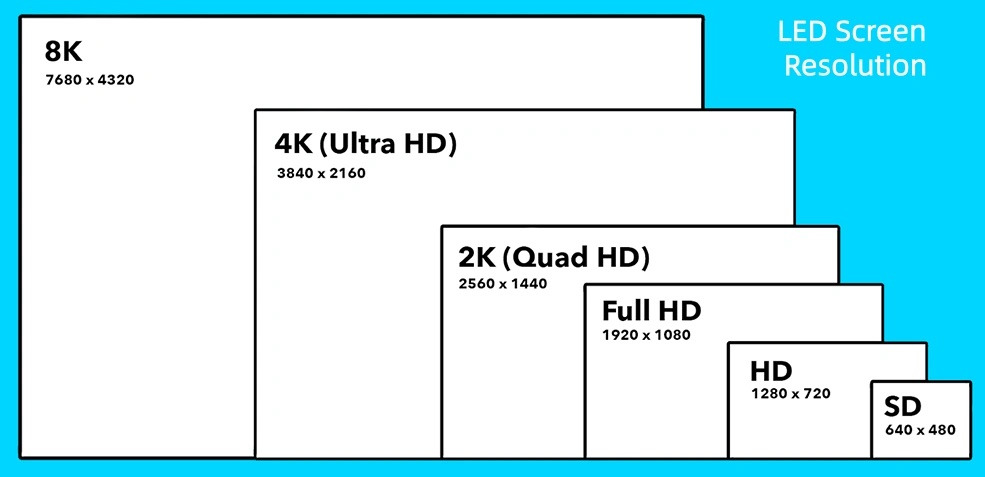
Resolution is just how many pixels your monitor has. More pixels means a sharper, more detailed image but also the drawback of worse GPU performance.
Here’s the cheat sheet:
1080p (1920×1080) – Best for 24 Inch screens and competitive gaming. It’s the best performing resolution and if you’re playing Valorant or CS2 at 240+ FPS, this is still a perfectly valid choice in 2025.
1440p (2560×1440) – The sweet spot. 78% more pixels than 1080p, sharp enough to notice, not so demanding that you need a flagship GPU that can run it. Best at 27 Inch screens.
4K (3840×2160) – For 32″ and above, video editors, and anyone who does detail work. You’ll need at least an RTX 5070 or better to game at 4K with upscaling.
The rule is simple: 24″ pairs with 1080p, 27″ pairs with 1440p, 32″ and above pairs with 4K. Anything outside of that and you’re either over-buying on pixels your screen can’t show, or under-buying and everything looks soft.
Spec 2: Refresh Rate – The Smoothness
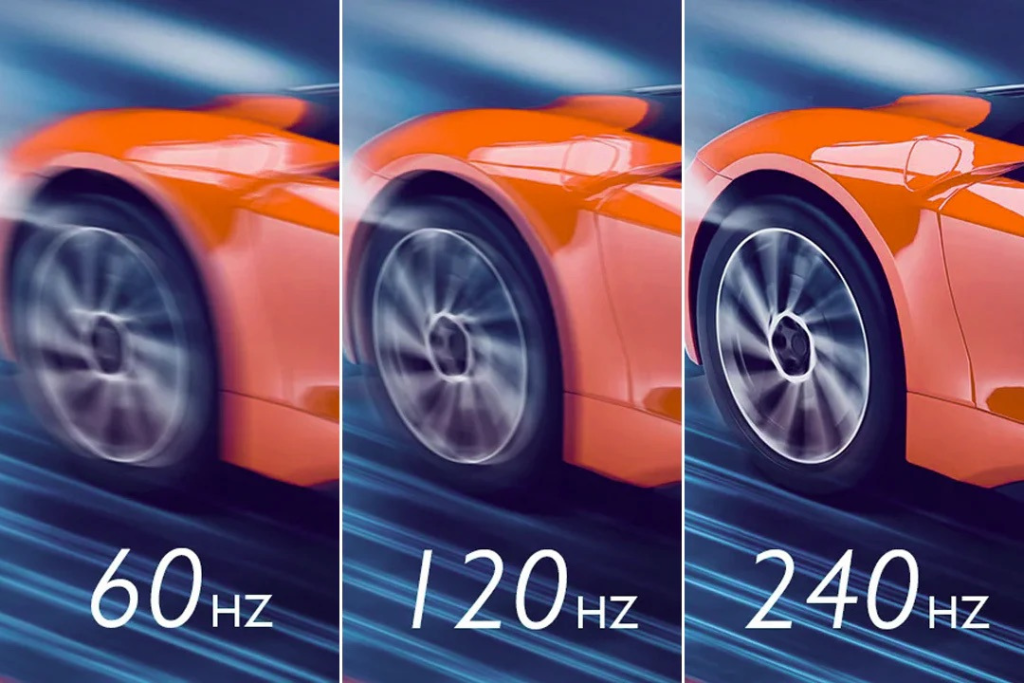
Refresh rate is how many times per second your screen redraws the image. Higher refresh rate means smoother motion, snappier response, and a real, measurable edge in fast-paced games.
60Hz – Fine for browsing, video, casual use. Very outdated for gaming today.
144Hz/120hz – The modern baseline. Anything below this for a gaming setup is a step backward.
240Hz – For serious gamers. Valorant, CS2, Apex – at this level it’s a real difference you can feel.
360Hz – Diminishing returns kick in hard here. Unless you’re playing at a professional level, you won’t notice the jump from 240.
One thing most people miss: a 240Hz monitor is completely wasted if your GPU can’t actually render 240 frames per second. Match your monitor to your machine, not the other way around.
Spec 3: Panel Type – Pick Your Trade-Off
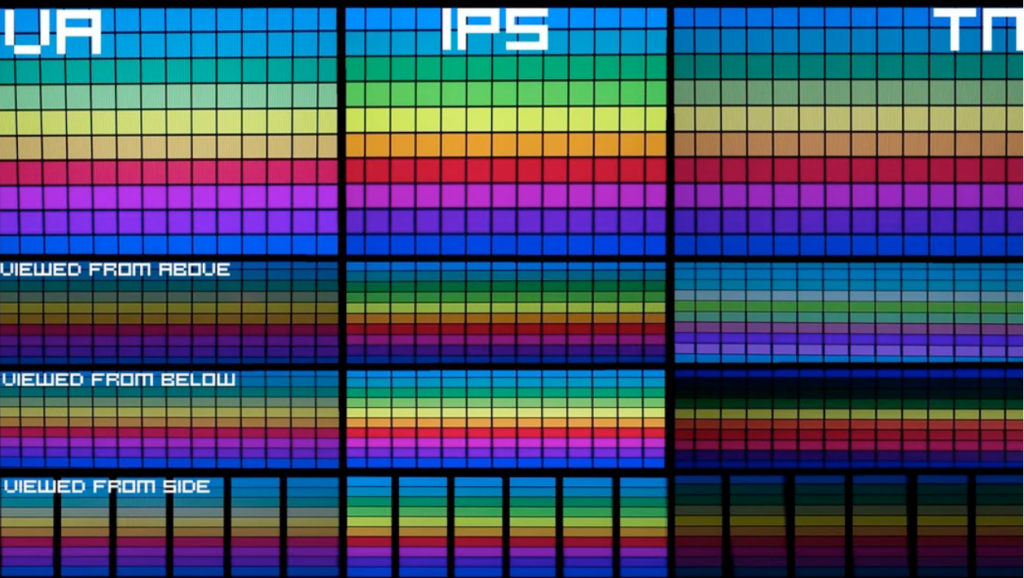
Monitors come in various different types of panels. Every panel technology gives something and takes something. There’s no one “best” panel – there’s only “best for what you do.” TN – Fastest response times (1ms), really bad colours, and restrictive viewing angles. Relevant only for budget esports builds where response time is the only spec you care about.
IPS – Best colour accuracy and widest viewing angles. The go-to for designers and anyone who needs their screen to tell the truth. Most good IPS panels hit 99% sRGB and 1-4ms response times.
VA – Deepest blacks and best contrast of the bunch at 3000:1. Great for movies, not ideal if you care about colour accuracy for professional work.
OLED – True black (infinite contrast), 0.03ms response, 99% DCI-P3 colour coverage. The best of every world. Also the most expensive. Worth it if your wallet agrees.
Spec 4: Colour Gamut and Bit Depth – For Anyone Who Cares About Colour
Skip this section if you only game. Read it twice if you edit photos, video, or do any creative work.
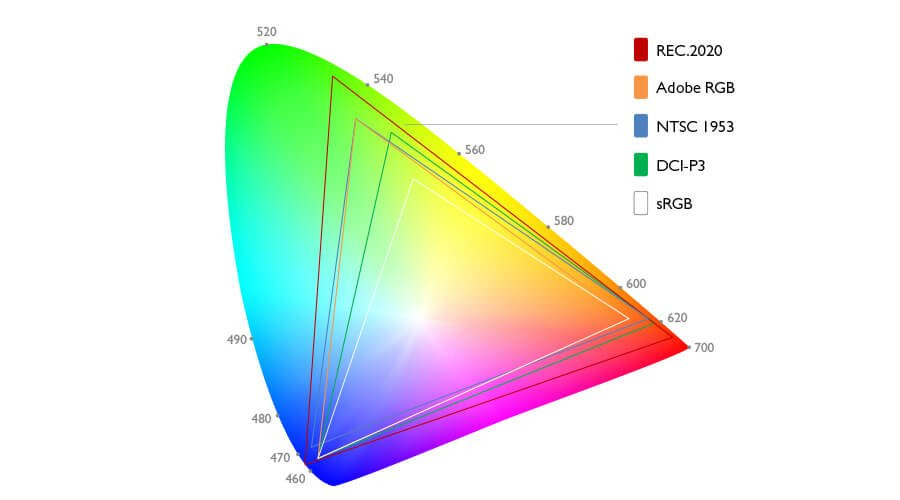
Colour Gamut is the range of colours a monitor can show:
100% sRGB – The minimum for any serious work. Covers web, social, and most consumer content.
95% DCI-P3 – Cinema and video editing standard. If you’re colour-grading anything, this is where you want to be.
99% Adobe RGB – Print, photography, brand work. Essential if your files end up in print production.
Bit Depth determines how smoothly colours transition from one to another:
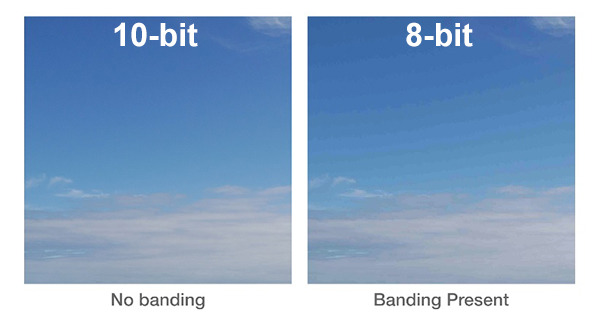
8-bit – 16.7 million colours. The honest minimum.
10-bit – 1.07 billion colours. Required for HDR workflows and professional colour work.
Gradients at 8-bit can look banded. At 10-bit they look like reality. One number most brands bury in the fine print: Delta-E. It measures how accurately a panel reproduces colour. Under 2 is excellent. Over 3 and your display is quietly lying to you about every shade of red and green you’re looking at.
Spec 5: Size, Aspect Ratio, and Curve – Real Estate for Your Eyes
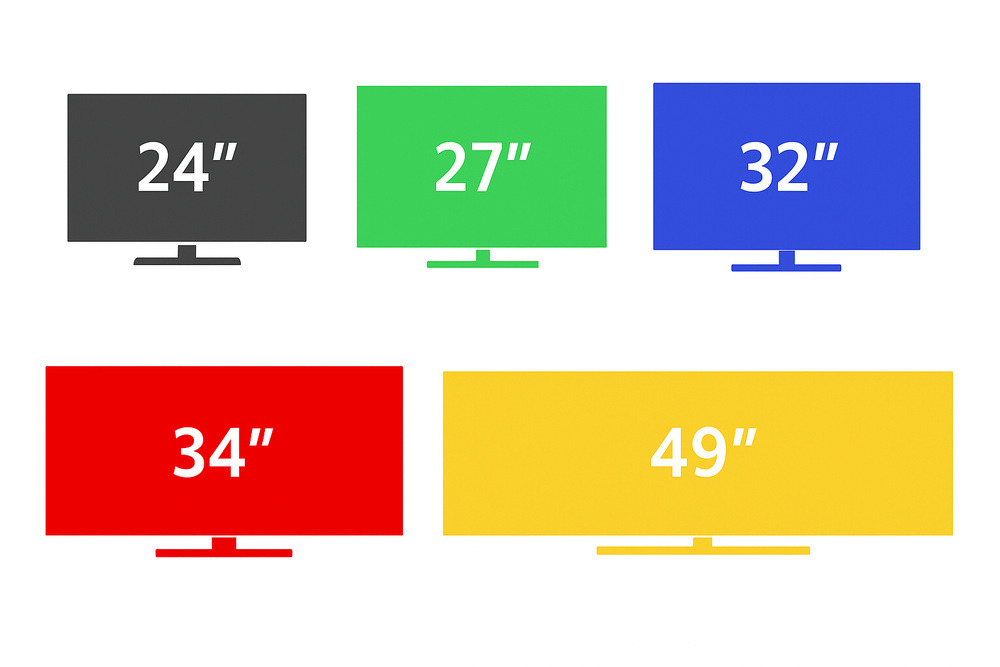
Size affects how close you sit. Aspect ratio affects how you work. Curvature affects how comfortable a long session feels.
24″ (16:9) – Esports, compact desks, secondary screens.
27″ (16:9) – The do-everything sweet spot. Works for gaming, design, and everything between.
32″ (16:9) – Video editing, 3D, immersive setups. Needs 4K to look sharp at this size.
34″ Ultrawide (21:9) – Timelines, multitasking, sim racing. Once you go ultrawide you will think twice before going back. This is a warning, not a recommendation.
On curvature: flat panels are better for design – straight lines stay straight and colour accuracy is consistent across the screen. Deep curves (1000R) are better for immersion in gaming. 1500R and 1800R are the middle-ground picks that work reasonably well for both.
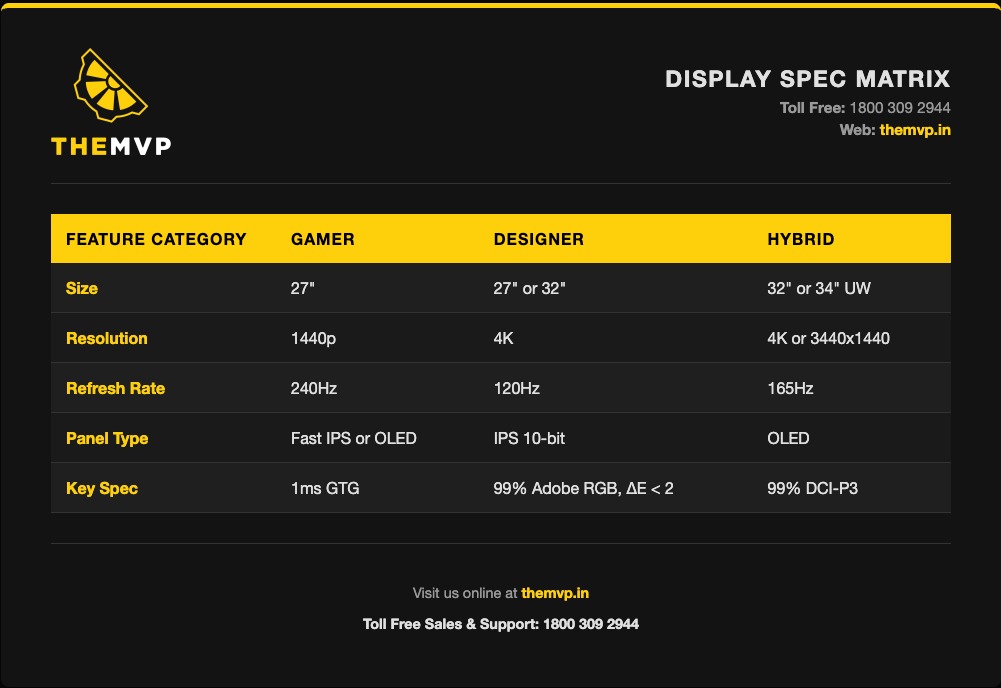
So What Should You Actually Buy?
End of the Day

The right monitor paired with the wrong PC is still a bad setup. We’ve been matching panels to machines – from RTX 5090 gaming builds to 4K render workstations to AI inferencing rigs – since 2015, across 220+ cities in India.
Tell us your workflow and we’ll spec the whole stack, not just the screen.
Got a specific workflow question – video editing, competitive FPS, virtual production? Drop it in the comments and we’ll answer.