Historically, graphics cards didn’t matter much in video editing, as most software was designed to lean heavily on the processor. However, by 2026, every major editing suite is now optimized to make use of the GPU in one way or another. And with the market price for 16GB VRAM cards climbing, editors are facing a choice: is it worth it to pay more for 16GB, or can 8GB still get the job done?
We’ll go through three of the most popular video editing software to see if your use case and priority demands 16GB VRAM.
Adobe Premiere Pro
In Premiere, the GPU helps with the export (encoding) and playing back your timeline (decoding). You will notice its power most when “scrubbing” moving the playhead through your sequences. If you edit multi-cam footage or notice a delay when moving through your timeline, you are probably missing out on the hardware decoders that come with a GPU and having more VRAM definitely helps with higher resolutions.
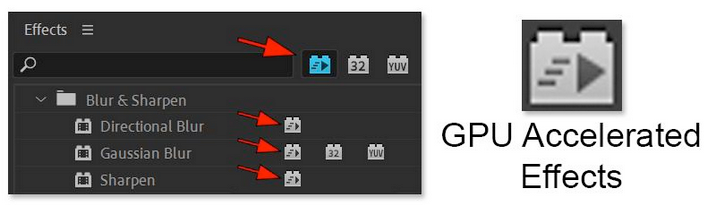
Look for this”GPU Acceleration” icon next to effect names. These effects run on your GPU rather than your processor. And each effect you add piles onto the VRAM usage. If you use many effects at once, you need more memory to keep the preview smooth.
6GB VRAM: Enough for basic cuts and short-form projects. RTX 3050
8GB–12GB VRAM: for higher resolutions and longer footage. RTX 3060, RTX 5060, RTX 5070
16GB VRAM: For multi-cam 4k footage and also heavy use of GPU accelerated effects. RTX 5060 Ti, RTX 5080
Adobe After Effects
After Effects is still much more reliant on the CPU and spending more money on CPU and RAM should be a priority. But having said that, After Effects uses the GPU differently. It relies on Multi-Frame Rendering, which allows the software to use every core of your CPU at the same time.
The catch is that each CPU core requires its own slice of VRAM to function. If you have a high-end CPU but a low-end GPU, your processor may not utilize all the cores because it lacks the memory to render frames. So you must deliberately balance your hardware:
- Mid-range (Ultra 5/7 Series, Ryzen 5/7 Series): 8GB of VRAM is usually enough to keep up with the cores. RTX 5060, RTX 3060
- High-end (Ultra 9 Series, Ryzen 9 Series, Threadripper): You should have at least 16GB of VRAM. RTX 5060 Ti, RTX 5080
DaVinci Resolve

Resolve is the most demanding of the three on the VRAM. It uses the GPU for a lot of its tasks, including color grading and image processing.
Fusion is the most VRAM heavy part of the app. Every “node” (effect) you add in Fusion takes up its own space in the VRAM and if you run out of VRAM, the program often stops entirely. And having more VRAM means that you can care less about optimizing your nodes for performance, which can save your time.
And unlike Premiere, which might just slow down, Resolve will give you a “GPU Memory Full” error and stop rendering.
- Ultra 5 Series, Ryzen 5 Series: RTX 3060 12GB, RTX 5060 8GB
- Ultra 7, Ryzen 7: RTX 5060 Ti, RTX 5070 Ti
- Ultra 9, Ryzen 9, Threadripper: RTX 4090, RTX 5090
Still Confused?
We have been building enterprise-grade hardware solutions for VFX studios and power users along with beginners for more than a decade. Feel Free to contact us or visit one of our stores in Hyderabad, Bangalore, Gurgaon and Mumbai.